How the build calculator works
Start with a class, choose an eligible race if you want one, and give your build a name. Add talents in the order you intend to buy them. The calculator keeps each investment, so returning to an earlier talent preserves its place in the route rather than replacing your previous steps. Then choose skills, equipment and in-run items to bring the whole plan together.
Use it before a run, while comparing two approaches, or when explaining a setup to another player. You can leave a build unfinished and continue later. Save a browser favorite for your own use, copy a link for someone to edit, or download one image containing the plan. No account is needed for any of these actions.
Talent point rules: 51 points and tree rows
Each class has a budget of 51 talent points across its trees. Row requirements count points inside the same tree, with rows opening at five-point intervals. Spending points in another tree does not satisfy that threshold. Read a talent’s details before building around it: the calculator checks recorded row thresholds and confirmed exclusions, while source relationships that lack verified rank requirements remain visible as hints.
The route records every point, including a sequence such as A, B, then A again. Consecutive upgrades to one talent share a step range in the timeline. Refunding removes that talent’s latest investment and renumbers later steps; refunds that would break a checked unlock are blocked. The remaining-point counter helps you adjust a route without losing track of the overall budget.
Best starting builds for all 9 classes
Choose a starting build below when you want a concrete plan to examine before making your own choices. Every card uses talents from the calculator’s existing class data and provides a loadable allocation, so its point totals and talent names can be checked directly in the editor. Read the short explanation to find a direction that fits the attacks or skills you want to use.
Treat these starting allocations as editable recommendations. Open a build, inspect its tree distribution, and change the route to suit your preferred progression. The class build guides provide more context; the calculator gives you a place to keep the resulting choices together. Compare the nine classes by their intended approach, then keep the version you actually want to play or share.

Warrior · Fury · Whirlwind healing
31-point starter core · 20 points left to customize
Start with Fury when you want a clear melee plan built around Whirlwind. This existing guide core invests in Cruelty and Bloodlust before opening Rampage, Flurry and Bladestorm. Blood Craze gives the route a recovery component, while Improved Whirlwind and Dual Wield Specialization keep the chosen damage tools connected. The template records the original purchase order, so you can see the early investments as well as the final ranks. It spends 31 points and leaves 20 for your own adjustments. Keep room for recovery and damage reduction in equipment, and avoid treating a damage loop as permission to stand inside every pack.
Talent allocation · 31 points
- Cruelty5/5
- Bloodlust5/5
- Improved Battle Shout1/3
- Rampage1/1
- Improved Cleave3/3
- Dual Wield Specialization5/5
- Improved Whirlwind3/3
- Flurry1/1
- Death Wish3/3
- Blood Craze3/3
- Bladestorm1/1

Paladin · Protection · Shield retaliation
31-point starter core · 20 points left to customize
Choose the Protection starter if you want Consecration and defensive effects to support the same close-range plan. The existing class guide builds from Improved Devotion Aura toward its shield-related core and Hammer of the Righteous, rather than mixing unrelated talents before the main route opens. Its appeal is a recognizable sequence: establish protection, maintain nearby damage, then use the remaining budget to address the pressure your run presents. The template spends 31 points and leaves 20 to customize. Review each talent and keep moving around dangerous enemies; a shield-focused route still benefits from reliable recovery and deliberate positioning during longer fights.
Talent allocation · 31 points
- Improved Devotion Aura5/5
- Redoubt5/5
- Improved Consecration3/3
- Spiritual Attunement3/3
- Weighted Hammer3/3
- Hallowed Ground1/1
- Improved Hammer of Justice3/3
- Blessed Life3/3
- Ardent Defender1/1
- Divine Intervention1/1
- Sacred Duty2/3
- Hammer of the Righteous1/1

Hunter · Marksmanship · Aimed Shot bursts
31-point starter core · 20 points left to customize
Use Marksmanship as a starting point for a ranged plan centered on repeated shots and Aimed Shot. The existing guide allocates Efficiency and Lethal Shots early, then works toward its shot-supporting milestones and Kill Shot. Keeping this core together makes it easier to choose skills that serve the same purpose instead of filling every slot with a different theme. The saved order shows how the first 31 points are invested and leaves 20 points open for your preferences. Compare crowd clearing with isolated boss damage when making changes, and use equipment choices to cover recovery rather than assuming range removes every survival problem.
Talent allocation · 31 points
- Lethal Shots5/5
- Efficiency5/5
- Piercing Shots1/1
- Mortal Shots5/5
- Ranged Weapon Specialization5/5
- Improved Multi-Shot2/2
- Rapid Fire1/1
- Barrage1/3
- Hawk Eye3/3
- Scatter Shot2/3
- Kill Shot1/1

Rogue · Combat · Sweeping strikes
31-point starter core · 20 points left to customize
The Combat starter suits players who want direct attacks to remain the center of their Rogue plan. It follows the existing guide through Lightning Reflexes and Precision into the route supporting extra nearby hits, Adrenaline Rush and Killing Spree. Sinister Strike and Eviscerate give you a straightforward skill focus to compare against the chosen talent ranks. This is a 31-point core, with 20 points deliberately left for customization once the main direction is established. Keep the talent route, skill priority and equipment choices consistent. When fights last longer or enemy density changes, reconsider recovery and positioning before spending every remaining choice on damage.
Talent allocation · 31 points
- Precision5/5
- Lightning Reflexes5/5
- Improved Sinister Strike3/3
- Endurance5/5
- Blade Flurry1/1
- Sword Specialization5/5
- Weapon Expertise2/3
- Adrenaline Rush1/1
- Aggression3/3
- Killing Spree1/1

Priest · Discipline · Shield sustain
31-point starter core · 20 points left to customize
Begin with Discipline when you want a Priest plan that puts shields and their supporting talents first. The existing guide opens with Unbreakable Will and Wand Specialization, then develops the shield-related core before reaching Penance. This gives you a readable starting sequence instead of a finished allocation that hides how it was assembled. The template uses 31 points and leaves 20 for changes that fit your preferred skills and equipment. Keep a direct damage option alongside the defensive plan, and distinguish talent-triggered effects from skills that occupy a chosen slot. A shield cycle is useful support, but it does not replace movement or reliable recovery.
Talent allocation · 31 points
- Unbreakable Will5/5
- Wand Specialization5/5
- Improved Power Word: Shield3/3
- Martyrdom5/5
- Divine Aegis1/1
- Mental Agility5/5
- Meditation3/3
- Mental Strength2/5
- Rapture1/1
- Penance1/1

Shaman · Elemental · Chain Lightning
31-point starter core · 20 points left to customize
Choose Elemental if you want to organize the Shaman around lightning rather than divide the early plan between several themes. This existing guide core starts with Convection and Concussion, then develops the talents supporting Lightning Bolt and Chain Lightning before reaching Elemental Mastery. The route makes it easier to compare repeated casts, jumps and direct damage while keeping the skill list focused. It spends 31 points and leaves 20 to customize. Extra jumps help explain the appeal against groups, but evaluate isolated targets separately. Use equipment and the remaining choices to cover recovery and incoming damage instead of assuming a strong clearing tool also solves survival.
Talent allocation · 31 points
- Convection5/5
- Concussion5/5
- Elemental Warding3/3
- Lightning Overload1/1
- Reverberation1/5
- Call of Thunder5/5
- Elemental Fury1/1
- Lightning Mastery5/5
- Storm Reach2/2
- Elemental Devastation2/3
- Elemental Mastery1/1

Mage · Fire · Critical explosions
31-point starter core · 20 points left to customize
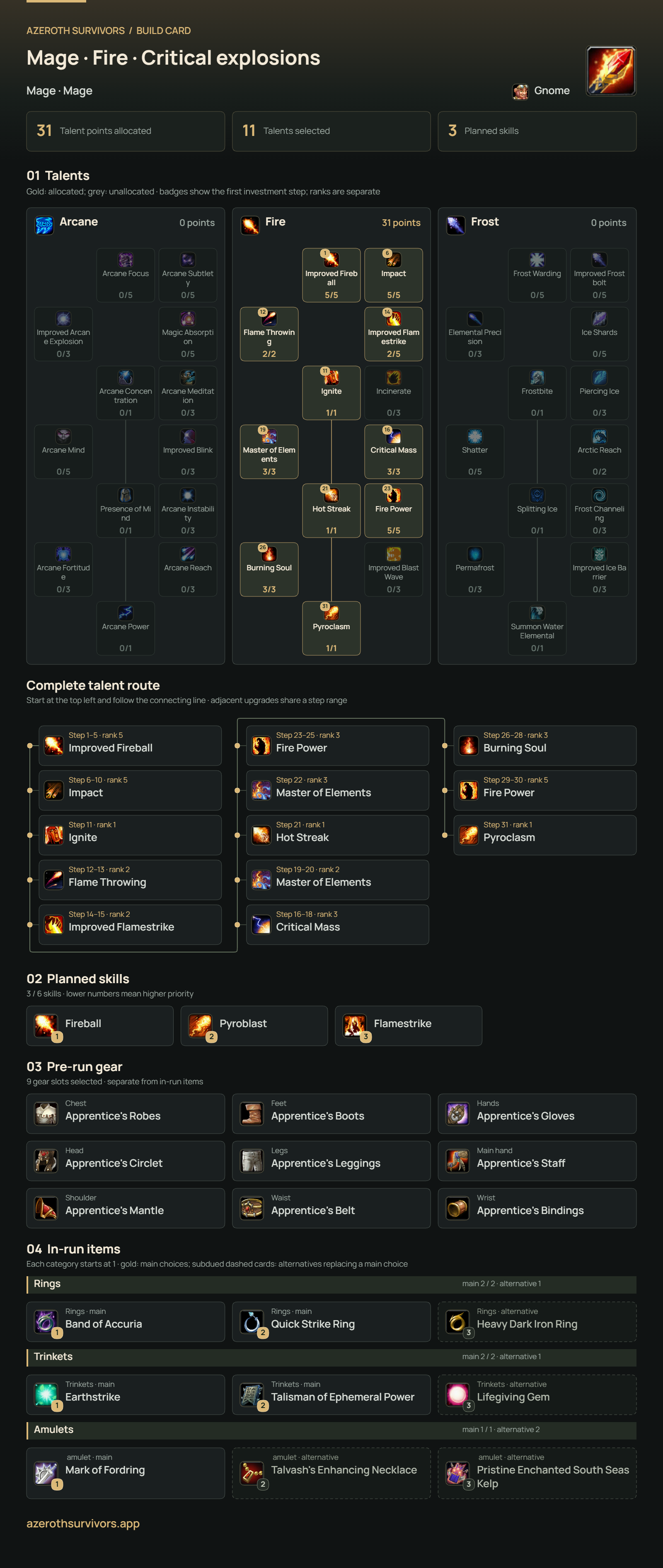
The Fire starter gives Mage players a connected plan for Fire spells, critical-hit interactions and kill effects. It follows the existing class guide from Improved Fireball and Impact toward Ignite, Hot Streak and Pyroclasm, while keeping Fireball, Pyroblast and Flamestrike in the same overall direction. The recorded order lets you follow the early ranks rather than only seeing a completed tree. This core spends 31 points and leaves 20 for your own changes. Compare sustained damage with clearing effects when facing a boss without nearby enemies. Add recovery or protection through the rest of the build instead of replacing every practical support choice with another damage spell.
Talent allocation · 31 points
- Improved Fireball5/5
- Impact5/5
- Flame Throwing2/2
- Improved Flamestrike2/5
- Ignite1/1
- Master of Elements3/3
- Critical Mass3/3
- Hot Streak1/1
- Fire Power5/5
- Burning Soul3/3
- Pyroclasm1/1

Warlock · Affliction · Spreading Corruption
31-point starter core · 20 points left to customize
Start with Affliction if you prefer a Warlock plan built around damage over time and spreading effects. The existing guide opens with Shadow Embrace and Suppression, then connects Nightfall, Contagion and Seed of Corruption with the chosen spell direction. Corruption and Curse of Agony give the talent choices a clear purpose, while Drain Life and Death Coil are available to consider alongside them. The template records a 31-point core and leaves 20 points for customization. Give ongoing effects time to work, keep an escape route open, and evaluate a lone boss separately from a crowded fight where spreading and death effects can contribute.
Talent allocation · 31 points
- Suppression5/5
- Shadow Embrace5/5
- Improved Curse of Agony3/3
- Improved Drain Life2/5
- Nightfall1/1
- Soul Reaping3/3
- Grim Reach1/1
- Shadow Mastery5/5
- Contagion1/1
- Siphon Life1/1
- Fel Concentration3/3
- Seed of Corruption1/1

Druid · Balance · Repeated Starfire
31-point starter core · 20 points left to customize
Use Balance as the starting Druid route when you want to keep spell choices organized around Starfire and related Arcane or Nature damage. The existing guide begins with Improved Wrath and Natural Weapons, then develops Omen of Clarity, Starfall and Force of Nature. Wrath, Moonfire, Starfire and Hurricane provide a coherent list to review against those talent investments. This template spends 31 points and leaves 20 for your own changes, with the original purchase order preserved. Compare repeated direct damage with area coverage before adding more choices. Keep recovery and protection visible in the equipment plan; choosing Balance does not automatically provide the tools of another tree.
Talent allocation · 31 points
- Improved Wrath5/5
- Nature's Grasp3/3
- Improved Moonfire1/5
- Natural Weapons5/5
- Omen of Clarity1/1
- Improved Starfire3/3
- Moonglow3/3
- Starfall1/1
- Gale Winds3/3
- Moonfury5/5
- Force of Nature1/1
Skills, gear and in-run items
Plan up to six skills, including the starting skills required by your class and selected talents. Additional choices retain their selection order, making a small number an explicit priority rather than a damage score. Equipment has its own class and slot checks, so your pre-run gear stays separate from the items you hope to find during a run.
Rings, trinkets and amulets each have their own priority list, starting at one. The main choices fill two ring positions, two trinket positions and one amulet position. You can select more items as alternatives; subdued, dashed styling separates them from the main choices. Use those alternatives to explain a replacement when a preferred item does not appear. Their order and category separation also carry into the exported image.
Share a build as a link or a single image
A build link lets another player load the configuration and keep editing it. Its fragment holds the selected class and race, talent ranks and recorded route, skills, gear and ordered in-run items. Make a new copy after changing the plan so the person receiving it gets the choices you intended to send.
For a discussion that should be readable immediately, download the build as a single PNG. The image contains the talent route, skill order, equipment and separate item priorities, with alternatives explained. Post the file in Discord or Reddit, or keep it beside your game as a reference. The static example below shows the format before you export anything. An image is a snapshot: export it again after making changes to the build.
Build calculator FAQ
Choose your sharing format according to what the other person needs to do. A link is useful when you want feedback on an editable build or expect someone to adapt it. An image is useful when the discussion should show the choices immediately, without asking the reader to open another page. Keeping both gives you a readable reference and a way to continue editing.
The answers below cover the point limit, supported classes, local saving and the contents of each export. If a choice looks unavailable, inspect its class, slot or talent requirements in the editor. When comparing a guide with the calculator, check the source version as well as the website’s current game label. Those details explain which data the plan is using.
Does Azeroth Survivors have a build calculator?
Yes. This independent player tool lets you plan a class and race, allocate talents, choose skills, and organize gear and in-run items. You can start from one of the class recommendations or build your own plan, then save it in your browser or share a link or image without creating an account.
How many talent points can I spend?
You can allocate up to 51 talent points across your class’s trees. Row thresholds count points in that tree, not the total across all trees. The calculator records the order of each investment and checks supported unlock rules. You can also save an unfinished allocation and return to it later.
Can I share a build with a link?
Yes. Copy the build link to share the selected class, race, talents, recorded point order, skills, gear and in-run items. The configuration is stored in the URL fragment after the hash. Opening it restores an editable build. Copy a fresh link after making changes; an earlier link keeps its earlier configuration.
Can I share a build as an image?
Yes. Use Download build image to export the configuration as one PNG that you can post directly in Discord, Reddit or another community. The file carries the visible build information, so readers can inspect it without opening the calculator link. It is a snapshot of the build when exported; download it again after changes.
What does the shared build image include?
The image includes the class and selected race, talent trees and recorded talent route, skill order, gear and in-run items. Rings, trinkets and amulets appear in separate groups, each numbered from one. Main choices and alternatives use different styling, with a legend explaining replacements. The export keeps the complete recorded route rather than only final talent ranks.
Do I need an account to save a build?
No. Favorites are stored in this browser on this device, and a shared link carries its own configuration. Browser favorites do not sync through an account, and clearing site data can remove them. Keep a link as an editable copy elsewhere, or download an image when you also want a readable snapshot.
Is the calculator up to date with the current game version?
Yes. The calculator’s talents, skills, equipment and in-run items are aligned with Azeroth Survivors v0.119.0. The version badge, game references and class guides use the same current version. Use the talent and item links in the data-source section to inspect the entries behind your build.
Which classes does the planner support?
The calculator supports all nine classes: Warrior, Paladin, Hunter, Rogue, Priest, Shaman, Mage, Warlock and Druid. Each uses its own talent trees, eligible skills and class gear. Race choices follow the recorded class restrictions. You can open a starting recommendation for any class, adjust it, and share the resulting plan.
Data source and game version
The calculator is aligned with Azeroth Survivors v0.119.0, the current version shown across this website. Its talent trees, skills, equipment and in-run items follow the same game data used by the talent, item and class guides. You can move between those pages and the calculator to inspect a choice, compare its effects and keep the resulting build together.
Talent names, rank limits, equipment and item effects come from the existing game-data catalogs, so you can inspect the entries used by the editor. Confirmed row thresholds and exclusions inform the calculator’s checks; unverified prerequisite details are shown as hints. Use the linked talent and item references to inspect an entry, and use the class guides for the reasoning behind a route. This is an independent player tool for planning and sharing configurations.
Inspect talent entriesInspect equipmentInspect in-run itemsGame version and patch notes
